Showing posts with label Copyright. Show all posts

Tuesday, December 18, 2012

How to find free pictures for your blog, using Creative-Commons search

This article describes the Creative Commons search tool, which you can use to look for pictures, videos, music etc that are available for other people to use under a Creative Commons license.


What is Creative Commons

Stick-man holding up a Creative-Commons-search logo, while thinking about some images he wants to find
Previously I've described how copyright applies to bloggers, how you can protect your blog-content from copyright theives, and what you can do if they take you work anyway.

The focus in that series was looking after your own rights.

But rights always come with responsibilities. The details vary by country, but in general you cannot just copy other people's recent work without their permission - in the same way that they cannot copy yours.

Some people, though, are happy to give other people permission to use their work, often with certain conditions (eg you must including an attribution link to the creator).

Creative Commons is an easy, legal way for creators to give permission for things they create to be used by other people. It is a framework which offers "licenses" that creators (writers, artists, composers, poets, etc) can apply to their work to say that other people can make copies, and what conditions apply  (eg non-commercial use, only if you attribute me, etc)

To use it, authors, artists, etc don't need to register their work. Instead, they go to the Creative Commons website and get code / text to put with their published work to show what rules apply.

Then they can publish or upload their pictures, writing etc anywhere they want, and by linking to the licence the work is as protected as anything on the internet can be.


How to find pictures & music that are Creative Commons licensed


Creative Commons have a very useful search tool, found at http://search.creativecommons.org

This is not a search engine. Instead it is a front-end-tool that lets you choose:
  • The keywords you want to search for (the search words)
  • The type of license that you need (use for commercial purposes - yes or no, modify, adapt, build upon - yes/no)
  • Which of the file host/search services to use (eg flickr, Google, Open clip art library - etc)


screen where you can enter creative commons search parameter values


Once you have entered the search options, click on the source that you want to look in, and you are  taken to that site and shown the results of the search-query and options you entered.

For example, when I entered:
  • "Christmas"
  • Commercial allowed (because I wanted to make a picture to use in Blogger-HAT, where I have advertising)
  • Changes allowed (because I wanted an image that I could use as the basis for another one, rather than exactly as it is now)

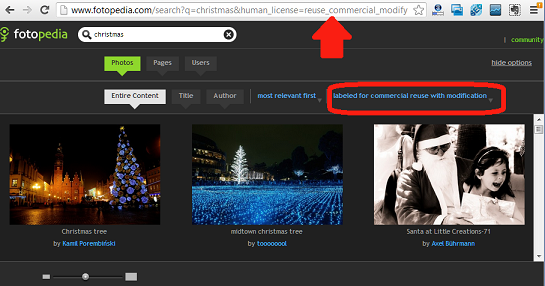
and clicked on Fotopedia, I was shown:

screen showing three Christmas-themes photos from Fotopedia, and their tools for changing pictures per screen and re-use options


From here I could use the search tools in Fotopedia to refine my image-search and find just the right picture that I could use to represent a Christmas carol worksheet on my blog.


What sources are included

Today, the sources that are linked to from Creative Commons search are:
  • Eurpoeana - media
  • Flickr - pictures
  • Fotopedia - pictures
  • Google web - web search results
  • Google images - pictures
  • Jamenda - music
  • Open Clip Art Library - images
  • SpinXpress - media
  • Wikimedia Commons - media
  • YouTube - video
  • Pixabay - images
  • ccMixter - music
  • SoundCloud - music


It wouldn't surprise me if this list grow/shrinks, as sites become more or less useful as sources of public-domain or creative-commons-licensed materials.


Things to watch out for

Creative Commons cannot guarantee that the results of searches that start in their tools will always be available for re-use: source systems may change their approach, items may be mis-tagged, content owners may change their mind, etc. So they recommend that you should always click-through to the original image in the source site, and double-check the license and attribution requirements there.

Also, some sites may allow you to link directly to the copy of the image on their site. this can be a lot quicker than making your own copy, uploading it and included it in your blog.  But doing this means that the image will not be used as the thumbnail-image for your post. And if the picture is ever removed from the original site - or its web-site address there changes - then the link in your blog will not work any more.


Related Articles:


Bloggers and Copyright - an overview

Protecting your blog-contents from copyright theft

Taking action when someone has used your copyright materials

Thumbnail images - a picture to summarise each post

Adding a picture to Blogger
Read more > How to find free pictures for your blog, using Creative-Commons search

Wednesday, August 15, 2012

Tools for applying copyright protection to your blog

This article is about the steps you can take to apply copyright protection to your blog.


Overview:

Based on a work By Binnette (Own work) [GFDL (http://www.gnu.org/copyleft/fdl.html) or CC-BY-SA-3.0-2.5-2.0-1.0 (http://creativecommons.org/licenses/by-sa/3.0)], via Wikimedia Commons
Previously, I've described how copyright applies to blogs in very general terms.

This is a more detailed look at the things to consider if you want to protect your "stuff" (ie words, pictures, tunes, blog-design, code, etc) from being used by other people without permission.  It covers:
  • Deciding what restrictions you want to apply
  • Telling readers what the policies are
  • Physically stopping people from making copies of your work
  • Making it obvious when your work is copied

Decide on your copyright policy

The first step in applying copyright to your blog is deciding whether people are allowed to make copies of your work, and under what conditions.

Many people initially say "it's mine, no one else can make any copies".

But some people want to share their materials and aren't looking for anything in return - hence the open copyright and Creative Commons approaches.   Other people are willing to share provided they get some of the credit for doing the work and/or some money.  Both the Wall Street Journal (Curse of the Greedy Copyright Holders and Their Fee-Seeking Lawyers) and YouTube's Head of User Experience (Margaret Gould Stewart: How YouTube thinks about copyright - as presented at TED) have some pretty good arguments about how sharing can make more revenue in the long run.  And thinking about what you might, realistically, do when someone breaks the law and makes a copy of your material may make a policy that allows copies-provided-credit-is-given more appealing.

Ultimately the decision about what policies to apply is yours - but you need to decide what policies you're going to follow before you can do anything about them.


Telling people what they can (or cannot) do

Once you've decided what copyright rules apply to your blog, it's good to tell your blog-readers what permissions you are willing to give for use of your material:
  • If you don't want to give any general permissions, you might put a text gadget with the phrase "© YOUR-BLOG-NAME" in a prominent position.
    (If you have a designer template, then the Attributes gadget already has a field where you can put copyright, provided you haven't removed it.)
  • If you are willing to give permission, but only on a case-by-case basis - say so.  And tell people how they can get in touch to discuss using your work.
  • If you are happy to give some general permissions (eg people can copy your material so long as they attribute it to you), you might investigate the Creative Commons options, and put a statement from them on your site.  Their site has a automated tool for adding a gadget, or you may like to add the HTML to your blog yourself.
  • To protect photographs or artworks, you could put a copyright statement right inside the image, either very obviously or as a faded-yet-visible watermark.  That way, anyone who sees a copy that someone has made will know that they photos are really yours.

Stopping people from copying your work

Physically stopping people from being about to make copies of  work is another approach.
    There are scripts that you can add to your blog that disable the right-click option for anyone who is viewing the page: this makes it harder to copy-and-paste text or to save pictures.  However I don't recommend this approach: it's easy for tech-savvy people to disable the scripts or to work around them (eg to look at your page source code and copy the picture location from it), and because it stops your viewers from doing other things (eg opening links in a new window) that they should be able to do.

    Another option is to stop people from copying text from your blog. As with disabling right-click, I don't much like this approach, and don't use it: as with disabling right-clicks, it doesn't apply to RSS-feed or email subscribers, and a determined copycat can either disable Javascript, or take a screen shot and OCR it, or even just re-type the content.  But it might be suitable for some blogs.   To do it, add this CSS rule to your template:
    .post-body {
    -webkit-touch-callout: none;
    -khtml-user-select: none;
    -moz-user-select: -moz-none;
    -ms-user-select: none;
    user-select: none;
    }

    One way to protect photographs is to save them as a fairly low resolution before you upload them:  this means they look ok web-pages (yours and anyone else's), but have very low quality if people try to print them or use them in places like a newspaper.   If you don't want to reduce the resolution, you can remove the ability to click on them, so that they don't open in a new window:  this won't stop people who can read the source HTML behind your page, but it will deter your average photo-copier.

    If you want to protect music you have composed or videos you've made, you might investigate registering your content with YouTube's Audio ID and Video ID system.   This won't stop other people from making copies of your work in other places, but it will stop them from uploading copies (or derived works, eg their own video with some of your music) back to YouTube - or at least give you some options for saying what should happen if someone tries to do so.


    Make copies obvious

    Rather than trying to stop people from making copies, an other approach is to simply make the original source obvious to anyone who looks at the copy.

    Watermarks:

    Adding a some partially-transparent text to photos or videos deters people who might copy your work (because it will be obvious that they've copied it), and makes the original source clear to anyone who sees a copy.  Most photo-manipulation tools now have tools for adding text to photos.  Make sure you keep a safe high-quality, un-watermarked copy of any  photos that you care about, as well as showing the altered one on your blog.

    Cross-linking:

    Long-term Blogger-HAT readers will have noticed that I'm putting more and more links to related articles into each post. I started doing this to be helpful (eg did you know you can add a Facebook "like" or "send button" button to individual posts as well as to your whole blog?)), and to stop repeating myself. But it's also a good tools for discouraging determined copy-cats:  they don't really want to link to me, so if they use my material they'll have to edit lots of links). And the casual or automated ones (who don't bother editing the links) just end up sending traffic to me.


    Use features that are built into other file types:

    If you use your blog to distribute other items (eg templates, eBooks, diagrams), you might like to consider more subtle ways of either is telling people about the copyright provisions, or just giving yourself the credit for work you've done.

    Example:  one of my sites gives away planning templates that are made with MS Word and PowerPoint.  I'm happy for them to be copied and changed, provided the copyright attribution is left intact.  Microsoft's File / Properties feature has a link to my website in each template, and often in Windows Explorer these values are shown when someone hovers their mouse of the files.  Over time I expect it to be a good tool for building the recognition of my blog.


    "Signing" your RSS feed

    If you put  a statement, crediting your blog as the source into your RSS feed, then every single item that is posted has your blog-name attached: copycats either need to edit it out manually, or leave it in and show the world where they got their content from.


    For example the line I have added to the feed of the blog you are reading right now is:
    This article is © Copyright – All rights reserved - Blogger-Hints-and-Tips.
    You may publish translated versions of this article on non-English language blogs provided you acknowledge Blogger-Hints-and-Tips as the original source.


    Blogger has a feature for setting this up:
    1. Go to Settings > Other > Site Feed 
    2. Add the words you want to use to the Post feed footer box, 
    3. Click Save Settings.

    (Something I'm not sure about - will be checking and updating this soon - is the footer added to the message sent to email subscribers?)


    Registering your work with a copyright-service

    There are a number of services around that let you "register" the copyright for an item.  This might give you peace-of-mind, or evidence to use in certain legal situations.

    But it won't make any difference to whether people make unauthorised copies of your blog-contents, so I'm not going into details about it here.

    The next article in this series, Dealing with people who have copied your work, has more detail about how these services work and what they're actually useful for - and suggestions about some other, possibly more useful, steps you can take.


    Related Articles:


    Copyright, Blogs and Bloggers, an Introduction

    Taking action when someone has made an unauthorised copy of material from your blog

    Putting 3rd party HTML (eg a Creative Commons licence) into your Blog

    Stopping the pictures in your blog from being "clickable"

    Finding a Picture's location (URL) in Picasa-web-albums

    Removing the Attribution Gadget from your Blog

    Types of blogger template.
    Read more > Tools for applying copyright protection to your blog

    Thursday, May 3, 2012

    Use Image Search to research picture ownership

    If someone shared a cool photo with you on Facebook or Pinterst, you might want to write a blog post about it.

    The post will be a lot more interesting if you can actually include the image. But you're not allowed to put copyright material onto your blog without permission - and how do you know if the picture that was shared with your is copyright or not, and who owns it.

    Google Image Search may be part of the answer. Find out about it.

    It won't tell you if a picture is definitely avaiable or not - but it gives you information from you can make some judgements based on when it first appeared, and what sort of web-sites it has appeared on..

    Remember - although you're not allowed to publish copyright material, you will only get "caught" if a copyright owner spots something on your blog and takes action by filing a DMCA report. There are a great many items which are fine to share, even though they're not technically in the public domain, because no one is actively claiming ownership - and image search gives a way of validating ownership claims made by chancers.
    Read more > Use Image Search to research picture ownership

    Tuesday, March 20, 2012

    Stop Pinterest from sharing your pictures or blog-posts

    This article shows you how to stop people from "Pinning" your blog-contents on their own Pinterest accounts.

    Recently I've been investigating  Pinterest, and why some blog-publishers, especially those of you who use pictures that you aren't authorised to distribute any further, may want to ...

    Stop people sharing your posts & images on PInterest [tweet this]

    I'll share more about this soon.   But in the meantime:


    How to prevent people Pinning from your posts:

    PInterest have provided  a way for website owners to make it impossible for people to Pin pictures or articles from their site, by adding a very simple piece of code.

    Unfortunately Blogger's post-editor doesn't allow meta-tags, so it cannot be applied to individual posts as you edit the post.  Instead, you have to add the code to your template file.   To do this:


    1)   Edit your template - you don't need to expand the widgets.


    2)   Find this text:
    <head>   
    (You may need to look for <head  SOME-OTHER-STUFF>, depending on what template you are using.   I just search for "<head", ie without the closing bracket, and make sure that I do what is needed after the closing bracket).


    3)   Add this line of code after the <head> tag:
    <meta name="pinterest" content="nopin" />
    Or

    If you just want to block a specific post from being shared on Pinterest,
    • add this code 
    <b:if cond='data:blog.url == "PUT-THE-POST-URL-HERE"'>
    <meta name="pinterest" content="nopin" />
    </b:if> 
    • and replace PUT-THE-POST-URL-HERE  with the full address of the post that you don't want anyone to pin from
      (eg http://blogger-hints-and-tips.blogspot.com/2012/03/putting-tweet-this-quote-link-in-blog.html)
    If you use the 2nd approach, you need to edit your template every time that you make a post that you don't want to be pinnable.   This could get tedious, and the list of meta-tags could get long.  But apart from that, there's no reason why this approach won't work "forever" or at least within whatever limits Blogger has about the number of blog-posts we can have.

    If you want to keep your template tidy, then you may want to find any other meta-tags already in the header section, and place this one with them. If tidiness matters to you like this, then I'm assuming you now enough to find the right spot, and to not nest the tags inside each other.


    4)   Preview (to make sure you've done it right)


    5)   Save the template change.


    What your readers see

    If you have installed the PInterest-blocking code, and one of your visitors tries to pin a blog-post of yours anyway, they get this message:

    Which reads   
    "We could't find any images:  This site doesn't allow pinning."
    even though Pinterest's own documentation promised that it will read:
    "This site doesn't allow pinning to Pinterest. Please contact the owner with any questions. Thanks for visiting!"

    Depending on your niche, you may want to have a note somewhere on your blog, explaining why you don't allow pinning of your posts, and why.


    How well does it work

    Based on some quick tests, it's working well:
    • The specific-post-only code worked when I tested it, too.

    That said, it cannot do magic.  Any moderately computer-savvy reader can get the direct URL for a photo in your blog, and pin that without going through the blog.   You could stop this by disabling right-clicks, but even so clever readers will just take screen-shots and make their own copy of your photo (and it has other side-effects too).    So for images that you particularly want to protect, the usual  blogger copyright protection techniques are still very relevant.


    Stopping sharing to other social networks:

    I don't currently know of any way to stop readers sharing your blog to any other social networks (Facebook Twitter, LinkedIn, YouTube, etc).  

    However, the other networks are more about sharing your status, and less about sharing other people's creations.   If you have privacy concerns that make you want to stop people there from sharing "your" content, then the best approach is probably to just not post the material to the internet at all.

    But if you do know ways to stop sharing, I'd love to hear about them.


    Related Articles:


    How to edit your Blogger template

    Copyright, blogs and bloggers - tools for applying copyright protection to your blog

    Linking your blog and the social networks

    Putting "share this on Facebook" etc buttons into your blog
    Read more > Stop Pinterest from sharing your pictures or blog-posts

    Wednesday, June 1, 2011

    Taking action when someone has copied your blog without permission

    This article is about the steps you can take when someone has made an unauthorized copy of something that is published on your blog.


    Finding out that your blog has been copied


    Previously, I've described how copyright applies to blogs in very general terms, and the steps you can take to apply copyright protection to your blog.

    Even if you follow these these steps, if you put material onto the internet it is quite likely that someone will copy it.

    This maybe done out of naivety, or as a deliberate attempt to rip you off, or as part of an organised spam-blogging ("splogging") operation.


    There are several way you might find out that someone has copied your work:
    • You, or your friends, notice it
      Maybe you or one of you readers searched for a certain phrase and you found your content elsewhere.  Or maybe you found a link to an identical post on a help-forum or discussion board.  If you use a lot of in-post linking (ie you link to another article in your content), and notice you are getting a lot of visits from somewhere unusual, then you might visit that site and find your post copied word-for-word, including the unchanged links.
    • Google's spam bots notice it:  
      If you get an email or a notice saying that your blog has been identified as potential spam, then one of the possibilities is that a real spammer has chosen your content.

    If you found out that someone has copied you work because Google's spam-bots detected the problem, then you simply need to follow the instructions in the email that Google sent you, or consult the Blogger Help Forums.  In short, you will be advised about a four step process that you need to follow.   This is tedious, but the nice part is that Google is dealing with the copy-cat for you, and (if you're not a spammer) you'll get your blog back.

    If you find out some other way, then you need to decide what do to about the problem (if indeed you believe is is a problem).   This is closely linked to what you want to achieve - this could be any of:
    • Do nothing - if you don't mind being copied, and you're willing to risk being incorrectly identified as a spammer
    • Getting the copied work taken down
    • Leaving the copy in place, with your name or URL  added beside it
    • Being paid compensation
    • Receiving a public apology
    and I'm sure there are other possible remedies, too.

    Once you know what you want to achieve, you can plan what steps you need to take, based on the notes in the next section.

    Reality check:  There is nothing wrong with being ambitious and wanting to receive $10M compensation.  But  unless you can afford really good lawyers, it might be a good idea to have a backup plan which involves a realistic goal too, eg having your name added to the copyright materials, or having them taken down.


    Steps for resolving copyright problems


    Start the easy way

    Unless you're certain that the copying was deliberate and malicious, the first step is most cases is to send a nice email to the person who made the copy, telling them that it's yours and what you want done about it.  (You might need to just leave a comment on their blog, if no email address is provided.)

      Report them to their internet service provider

      The obvious first step if politeness doesn't work is to complain to their web-host:
      • If they use Blogger (ie their URL is WHATEVER.blogspot.com, or they have a custom domain but the source-code on their site looks like Blogger code),
        then you should contact Google through this page:   http://www.google.com/blogger_dmca.html 
        Google have a very thorough process for dealing with claims of content stealing - and if the other site that you say has stolen your work is also published in Blogger, they can look at the dates in their database to see who actually published it first.
        Make sure that you read all the details of Blogger's policies before you submit a complaint:  they don't like malicious complaints, and you could be fined quite heavily if you claim that you own something which you don't really own.
      • If the person who has copied your work isn't using Blogger, you may need to do some detective work with whois (use Google-search it to find a whois service for the domain you're looking for) to see   who the host is, and what process this host uses to resolve copy-right complaints. 
        This could be particularly difficult to do if they're not located in the same country that you are (so their laws will be different), or if they use a different language.
      • If the person who has copied your work has put it into YouTube, you can use information and tools on  YouTube's opyright page.


      Complain to other services:

      If their web-service-provider can't or won't help, then you could try reporting them to other services that the use.  

      For instance many websites are also on Facebook:  if the contents includes your material, or links to a website that's distributing your copyright material, you may be able to use Facebook's intellectual property violation reporting process.  (I haven't tried it myself, but have been told that this can be particularly effective.)

      If they show advertising on their site, then complaining to either the advertisers, or to the company that organises the advertising programme, may be effective.  AdSense is quite sensitive to not having it's ads shown along with copyright violations, and provides a policy violation reporting form that you can let them know about the problem.


      Charge them

      Logodollar2Some people have had success from sending the offender a bill for use of your work.  This takes a bit of thought:  if they pay the invoice, then legally you may have licensed them to use your work for far less than it is worth.   On the other hand, if the amount that you ask them for is ridiculously high, they will probably just laugh and ignore you.


      Threaten legal action

      This can be fun:  write a very formal-sounding letter demanding that they cease-and-desist from using your work (name it very specifically) by a certain date, and advising that failure to do so may incur penalties including but not limited to commencement of legal proceedings for in which you will be looking for legal expenses as well as damaged incurred.  

      If you would actually be willing to sue the person (see the section below), then consult a lawyer, and get them to send the letter.   But if there's no chance that you actually will sue  (and most bloggers simply don't have the time, resources or levels of proof to do so), just make the letter sound good.   If necessary, get a friend who can write pompous-sounding letters to draft it for you.    Send it by regular mail - emails are too easily ignored - and make it look official.

      Finding the address to send a letter to can be a challenge - one option is to scour your copy-cat's work, and see if you can find their company or personal details on LinkedIn (most are smart enough to hide themselves on Facebook).    And if you can, then complaining to their boss may be an option, too, depending on your niche and whether their action might be harming their company's reputation.


      Legal action

      If all else fails, another option is to sue the person or organisation that copied your work.  If you or the copy-cat are in the USA, then the Digital Millennium Copyright Act (DMCA) provides an approach for this.   But if you and they are in different countries, then different laws and processes may apply.  But no matter where you are, two things are likely:
      • You will need to hire a lawyer - so it may be expensive and take a lot of time, and
      • You may need to prove that you really did create the work, and when it was made.   
      The second point is where copyright registration services come in to play:  they provide evidence that you really had created the work as at a certain date.  Unfortunately this is one of the ironies of copyright:  listing your material with a copyright service does nothing to stop anyone using it.  But if you don't list it shortly after it's created, you probably won't have any evidence if you ever get to the point of wanting to sue (or even formally complain about) someone who has copied your work.

      There are some other issues with copyright services too:
      • It can be difficult to list a blog, which by its nature has different material being loaded very frequently.
      • You won't necessarily know which services(s) to register with - because you don't know where someone who copies your work is located, so you won't know what services a court in your country will accept evidence from.
      So, while I'm not advising you to avoid the registration services altogether, it's important carefully to choose when and how to use them.

      Peer pressure / Name-and-shame

      If the legal approach doesn't work, or would be too expensive, then another option is to use social pressure to convince your copy-cat that they need to stop copying your work etc.  This can take a range of formats - eg, if a local small business has copied your photograph and isn't willing to compensate you, you might get all your friends to contact the business and threaten not to buy there again.   Or you might start a Facebook campaign, or put a video on YouTube telling your side of a story.   Whatever you do, make sure you that you:
      • Really know what you want to achieve:  fame, a pay-off to stop the campaign etc
      • Consider the risks (ie what could go wrong) and whether they're worth it
      • Don't break the law yourself (it's not worth it, especially if you're the small guy), and
      • Think strategically about what you might do, and how this could affect the relationships in your area or niche:  some people are just too much trouble to have an enemies.


      DISCLAIMER

      This article contains general advice about the copyright issues faced by people who use Blogger.   It cannot cover every possible case or specific legal systems. 

      If you need legal advice about a particular situation, consult a lawyer, ideally one who is familiar with copyright law in your country.

      I do not, under any circumstances, suggest using illegal approaches - threats of violence, sabotage, etc.


      Related Articles


      Copyright, Blogs and Bloggers, an Introduction

      Tools for applying copyright protection to your blog

      Putting 3rd party HTML (eg a Creative Commons licence) into your Blog

      Removing the Attribution Gadget from your Blog
      Read more > Taking action when someone has copied your blog without permission

      Wednesday, November 24, 2010

      Stopping pictures on your blog from being "clickable"

      This article is about how to stop people who read your blog from clicking on a picture and seeing a full-size copy of it.


      Currently, if you put a picture into a blog post using the Picture toolbar item, and someone reading your blog clicks on that picture, then the person sees a full-size copy of the picture.   There is no universal setting that you can apply to stop this happening, or even an easy way to stop it for specific pictures.

      But you can stop it for each picture in a post by editing the HTML that is behind the post and removing the href part of the picture statement.   If you're not sure what that means, read on.


      Making a picture "unclickable"


      1  Put the picture into your post in the usual way.

      2  Find some unique text that is immediately before (or after) the picture - you will use this to locate the HTML for the picture among all the other HTML used to make up your post.
      Sometimes, I put "XXX" or some other marker text (ie text that isn't used anywhere else in the post) just before it  (and take it out again afterwards too!).

      3  Click HTML - it's a tab at the top corner of the Post Editor window.

      Find the unique text (use your browser's Find tool, eg Edit > Find in Firefox)  

      5  Then find the HTML-code for the picture which will be just before (or after) that.    It looks something like this (some settings may be different in yours):
      <div class="separator" style="clear: both; text-align: center;">
      <a href="https://blogger.googleusercontent.com/img/b/R29vZ2xl/AVvXsEinoCg7UdU8x_k_56SBWOzwxD2DSXgVRR0mFrt8czYvyj2FaKCa9GFotuerx-8s7nDlJ3WfBXdYWSnvT1vzNwP1l2RJHPyJDBhWM2oNPlF8uQeJKst9emhX79oC0e53ja8d8fv1-3djRo_E/" imageanchor="1" style="margin-left: 1em; margin-right: 1em;"><img border="0" height="235" src="https://blogger.googleusercontent.com/img/b/R29vZ2xl/AVvXsEinoCg7UdU8x_k_56SBWOzwxD2DSXgVRR0mFrt8czYvyj2FaKCa9GFotuerx-8s7nDlJ3WfBXdYWSnvT1vzNwP1l2RJHPyJDBhWM2oNPlF8uQeJKst9emhX79oC0e53ja8d8fv1-3djRo_E/" width="400" /></a></div>
      That looks hard to read.   But if you break it down, it becomes something like:
      <div class="separator" style="clear: both; text-align: center;">
      <a

      href="THE URL THAT THE USER IS TAKEN TO IF THEY CLICK ON THE PICTURE"

      imageanchor="1" style="margin-left: 1em; margin-right: 1em;"
      >
      <img
      border="0"
      src="THE URL WHERE THE SOURCE PICTURE IS READ FROM"
      />

      </a>
      </div>

      NB  provided you've selected "Use <br /> tags" under Edit HTML Line Breaks, then you can add extra new-lines, to make the code easier to read.

      6  To make the final picture unable to be clicked, you need to remove the part of the HTML code that says:   
      href="THE URL THAT THE USER IS TAKEN TO IF THEY CLICK ON THE PICTURE"

      So that the eventual code for the picture looks like:
      <a

      imageanchor="1" style="margin-left: 1em; margin-right: 1em;"
      >
      <img
      border="0"
      src="THE URL WHERE THE SOURCE PICTURE IS READ FROM"
      />

      </a>

      Job Done!

      At this point, you might Publish your post, or you might want to edit it some more - for example by adding alt-text or a title to the pictures, or by showing your pictures in a slideshow.

      Either way, I recommend switching back to Compose mode now (using the Compose button at the top right of the editor), so that you don't get confused the next time you edit a post.


      Related Articles:


      Putting a picture into a blog post

      Telling Google and visibly-impaired people about the pictures in your blog

      Tools for applying copyright protection to your blog

      Hosting pictures outside of Google/Picasa

      Creating a button that links to your blog
      Read more > Stopping pictures on your blog from being "clickable"

      Saturday, October 30, 2010

      Finding the URL of a picture stored in flickr

      This article is about how to find the link (URL, web-address) of a photograph or picture that is stored in Flickr.

      What is Flickr?

      Flickr is one of many on-line photograph hosting services.   It is particularly attractive to bloggers because it includes collections of photographs that can be used without being subject to any copyright restrictions.


      Getting the URL of a picture that is stored Flickr:

      Option 1:   
      Use a web browser (eg Firefox, Chrome) which has a "copy URL" or "copy shortcut) option in the right click menu.
      • Go to the photograph in a general window
      • Put the cursor over it, and click the right mouse button
      • Choose   "Copy Link Location", or "Copy shortcut URL" or similar

      This puts the link to the photograph into your computer's memory, so you can go to another application and paste it.


      Option 2:  
      From flickR's photo-detail page, or if you are using aweb-browser (eg some versions / installations of Internet Explorer) without a copy-option in the right click menu:
      • Go to the page in Flickr that shows the details of the photo
      • Choose the Share This drop-down men
      • Choose Grab the Link, and copy the highlighed code


      Related Articles: 


      Inserting a picture into a blog post

      Finding a picture's location in Picasa-web-albums

      Taking action when someone has copied your blog without permission

      Showing a PowerPoint presentation in your blog

      Copyright, Blogs and Bloggers

      Stopping pictures on your blog from being "clickable"
      Read more > Finding the URL of a picture stored in flickr

      Friday, October 15, 2010

      Copyright, Blogs and Bloggers

      This article presents a very short intoduction to issues of copyright, and how they apply to bloggers and their blogs.

      DISCLAIMER

      This article contains general advice about the copyright issues faced by people who use Blogger.   It cannot cover every possible case or specific legal systems.  If you need legal advice about particular issues, consult a lawyer, ideally one who is familiar with copyright law in your country and/or internationally.

      What does "Copyright" mean?


      In most countries, the law says that as soon as you create something (eg write an article, take a photograph, draw a picture, compose a tune, draw a map, make a slideshow), you own the "rights" to it for for a certain amount of time, usually until a number of years after you die.  And they exist just because you created the item:  there is no need to register it in any way.

      While the rights apply (ie the thing you created is still "under copyright") other people are not allowed make a copy of it - in any format - without your permission.  Once the rights have ended, the item becomes "public domain" and other people are free to make copies of it.

      If someone does make a copy without your permission, then they are breaking the law and legal action can be taken against them.   How this happens (criminal charge, private prosecution, etc) is different from country to country.  But breaking copyright is normally a "civil law" issue, local law-enforcement officials (police, etc) don't get involved, and it's up to you to prove that you owned the rights in the first place.


      Consequences for bloggers


      In short, what this means for people who righr blogs is that:
      • You "own" the stuff (words, pictures, videos layouts, etc) that you create
      • If other people copy it without your permission, they're breaking the law
      • If people copy your stuff, it's over to you to do something about it - if you want to.
        • If you copy other people's stuff without their permission, you are breaking the law.


        Another important point is that copyright only applies to specific works, not to ideas.  For example:
        • It's not ok for someone to make a direct copy of your picture, but generally they can make a similar photo themselves and use it
        • It's not ok for someone to copy-and-paste a recipe that you invented, but it is ok if they invent a very similar item and type up the recipe themselves.

        Of course this is a very broad statement.  There are detailed laws about Patents (the legal way of protecting ideas), about derived works (creations that are based on a work, but not quite the same as it), and fair use.   These laws vary between countries, so it is impossible to go into any more detail about them here.


        Next:


        Related Articles:


        Protecting your blog from being copied

        Taking action against unauthorised copies of your work

        Assessing an idea for a new Blog

        Removing the Attribution Gadget from your Blog

        Types of blogger template.
        Read more > Copyright, Blogs and Bloggers
         
         
        Copyright © blog
        Blogger Theme by Blogger Designed and Optimized by Tipseo